
There is no single best youth soccer club software. The right choice depends on what kind of club you run, what your state association requires and which job costs your volunteers the most time. This guide maps the main types of platforms in 2026 with examples, shows which matter most for each kind of club, and gives you four tests and a cost formula to use in every demo.
We make Centro, which is one of the options. We do not rank competitors, and we have left out prices we could not confirm on a vendor's own page.
What changed in 2026
Two changes affect anyone shopping this year.
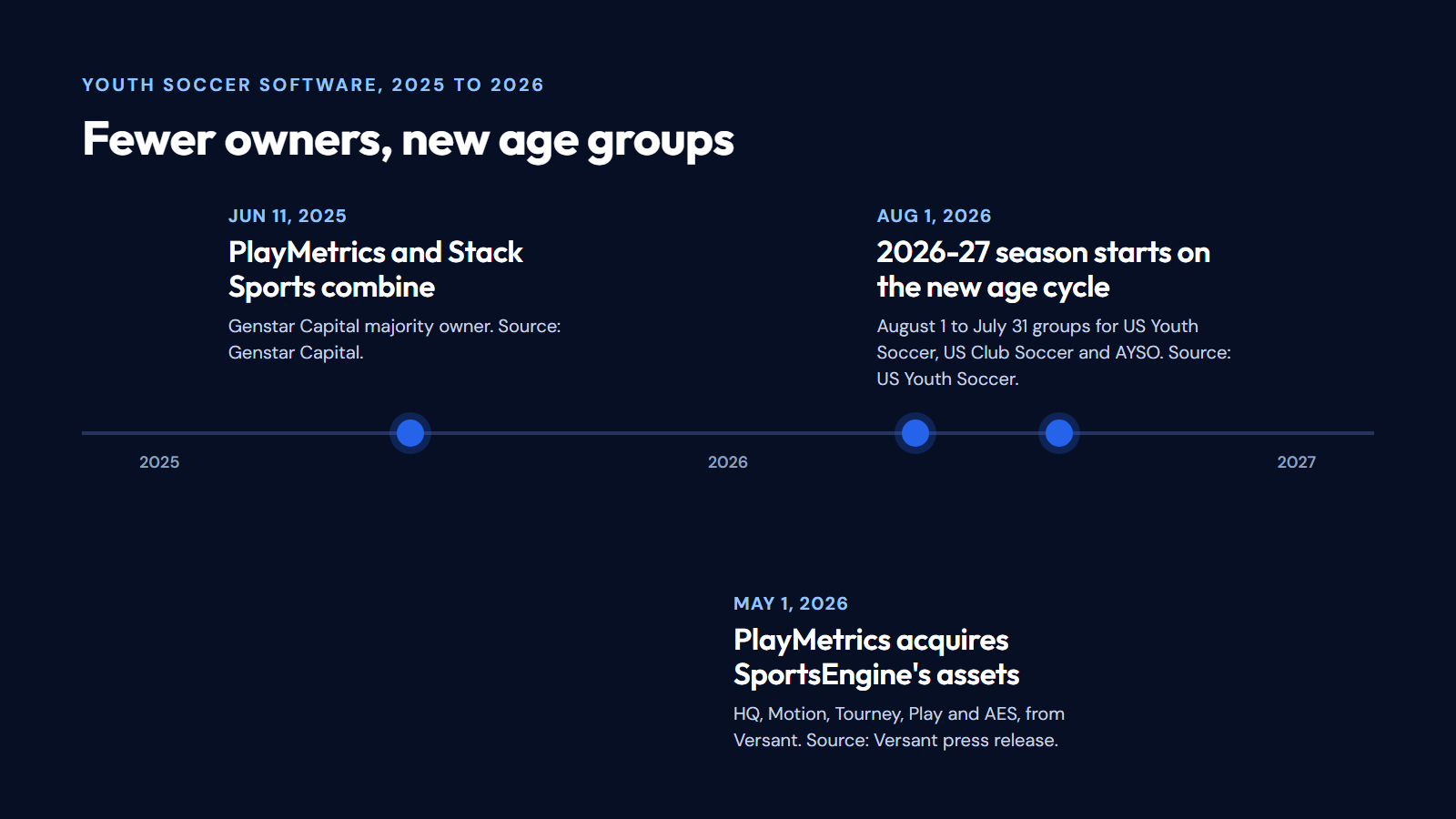
Ownership consolidated. PlayMetrics and Stack Sports combined in June 2025 under Genstar Capital. On May 1, 2026, PlayMetrics acquired substantially all of SportsEngine's assets from Versant, including SportsEngine HQ and SportsEngine Tourney, and SportsEngine's site now says it is part of PlayMetrics. If you are evaluating any of these products, ask which product you would be signing for, what the roadmap is, and what your contract says about price changes and data if products are merged.
Age groups moved. US Youth Soccer, US Club Soccer and AYSO switched to an August 1 to July 31 age-group cycle from the 2026-27 season. Ask every provider how its registration forms decide a child's age group, and test a few birth dates in the demo. Not every platform uses the new cycle; Centro's registration forms, for example, check age by birth year.
Most "best of" lists are written by vendors
Search for this topic and most of the ranked lists come from software companies, and the publisher usually ranks itself first. That does not make them useless, but read them as marketing. Prices in those lists also disagree with each other and go out of date quickly, so ask each provider for a written quote instead of relying on a third-party table.
The main types of platform, with examples
Club software comes from different starting points, and that history shows in what each does well. The examples below are not a complete list or a ranking, and the descriptions come from each company's own site as of October 18, 2026.
Team apps that grew into club tools. They started with one team's schedule and chat and added registration and payments for clubs. Families may already have the app. Example: TeamSnap, which describes itself as team, club and league management, with a club and league product called TeamSnap ONE. Check: one registration across many teams, club-wide finances and staff permissions, and a quote for the club product rather than per-team plans.
Club and league operations suites. Built around registration, payments, rosters and scheduling for whole organizations. Examples: LeagueApps, aimed at clubs, camps, tournaments, leagues and facilities; SportsEngine, now part of PlayMetrics, aimed at clubs, leagues and tournament organizers; and PlayMetrics itself. Check depth in the jobs you use weekly, not the length of the module list.
Competition and association systems. Built for sanctioned play: player cards, eligibility, tournaments and governing-body registration. Example: GotSport, which describes itself as serving clubs up to governing bodies. If your state association requires a specific system, find out exactly what it covers for you before you buy anything else. Affiliated Florida clubs can start with FYSA's registration guidance.
Website-first builders. Aimed at volunteer boards whose main need is a club website with sign-up forms and payments. Example: Jersey Watch, which targets recreational leagues, club programs and camps. Check the roster, balance and messaging side carefully, because collecting registrations is the easy part.
Club operations platforms with bilingual families in mind. This is where Centro sits: registration, payments, scheduling, communication and coaching tools in English and Spanish, at one price per club. The section on Centro below says what it does and does not do.
Which type to shortlist for your club
Your club | What matters most | Start your shortlist with |
|---|---|---|
Recreational, volunteer-run, one season a year | Simple parent sign-up, few admin steps, low fixed cost | Website-first builders, team apps with club plans, club operations platforms |
Competitive club with tryouts and travel teams | Tryouts, team formation, association player registration | Club and league suites, plus whatever your association requires |
Academy with many programs or year-round sessions | Several programs and fees at once, staff permissions, recurring schedules | Club and league suites, club operations platforms |
League or association running divisions | Schedules across clubs, standings, eligibility | Competition systems, club and league suites |
Club where many families speak Spanish at home | Every parent-facing step, email and waiver in both languages | Any type, tested end to end in Spanish |
Then run the same four tests with every provider you shortlist.
Four tests to run in every demo
Bring your registrar, your treasurer and one coach, and use made-up data only. Never upload a real player list to evaluate software.
1. A parent registers two children from a phone. Tap the link on a phone, not the presenter's screen. Add a second child in a different program and count how often the parent retypes their details. Check that each child gets their own waiver signature and program, and that the confirmation says whether the child has a place or an application under review. If your families speak Spanish, do it again in Spanish.
2. Follow one fee to your bank. Ask to see the fee, any discount, any service fee, and what happens with a cash payment and a refund. Then have your treasurer answer three questions alone: what does this family still owe, what did we collect this month, and which deposit in our bank account does this payment belong to? Ask whose account the money lands in, who sets the payout schedule, and what happens to the money and records if you leave.
3. A coach finds what they need at the field. Log in as a coach. Find the roster, today's session and a parent contact on a phone, and check that the coach cannot see what they do not need, such as medical details for other teams or club finances. Move a practice and see exactly who is told, how and in which language.
4. Get your records out. Request an example export of players, guardians, registrations and payments. Check that guardians stay linked to the right children. Ask how long you can read old waivers and invoices after you cancel, and at what cost.
A parent registers the right child in the right program on a phone, without help.
A second child is added without retyping the parent's details.
Waivers are readable on a phone and signed for each child.
Registration works in every language your families use.
The age group for a few test birth dates matches your league's 2026-27 rules.
The treasurer sees what a family owes and what was collected, without exporting.
Cash and checks can be recorded against the same balance.
The treasurer can match an online payment to a bank deposit.
A coach sees the right roster and schedule, and nothing they should not see.
A changed practice reaches the right families, and staff can see that it went out.
Players, guardians, registrations and payments can be exported.
The quote lists every charge: subscription, per-player or per-team fees, payment fees, setup and add-ons.
A promise to add something later counts as "not shown." Write the date and the plan you were shown next to each line.
Compare the total cost, including payment processing
Ask every provider for the total cost in writing: subscription (per club, team or player), any per-registration or per-payment fee and who pays it, payment processing, setup or import fees, contract length, and the cost of keeping access to old records. Then put the same club through every quote.
Here is the calculation with Centro's published pricing, for a made-up club. Assumptions: 240 players, each paying one $180 registration fee online by card, one payment each, Stripe's standard US card rate, no service fee passed to families.
Registrations collected online: 240 × $180 = $43,200
Centro subscription: $25 a month × 12 = $300
Centro fee, 2% of online payments: 2% × $43,200 = $864
Stripe card processing, 2.9% + 30¢ per payment: 240 × ($5.22 + $0.30) = 240 × $5.52 = $1,324.80
Total for the year: $2,488.80, about 5.8% of what the club collected. Centro's own share is $1,164.
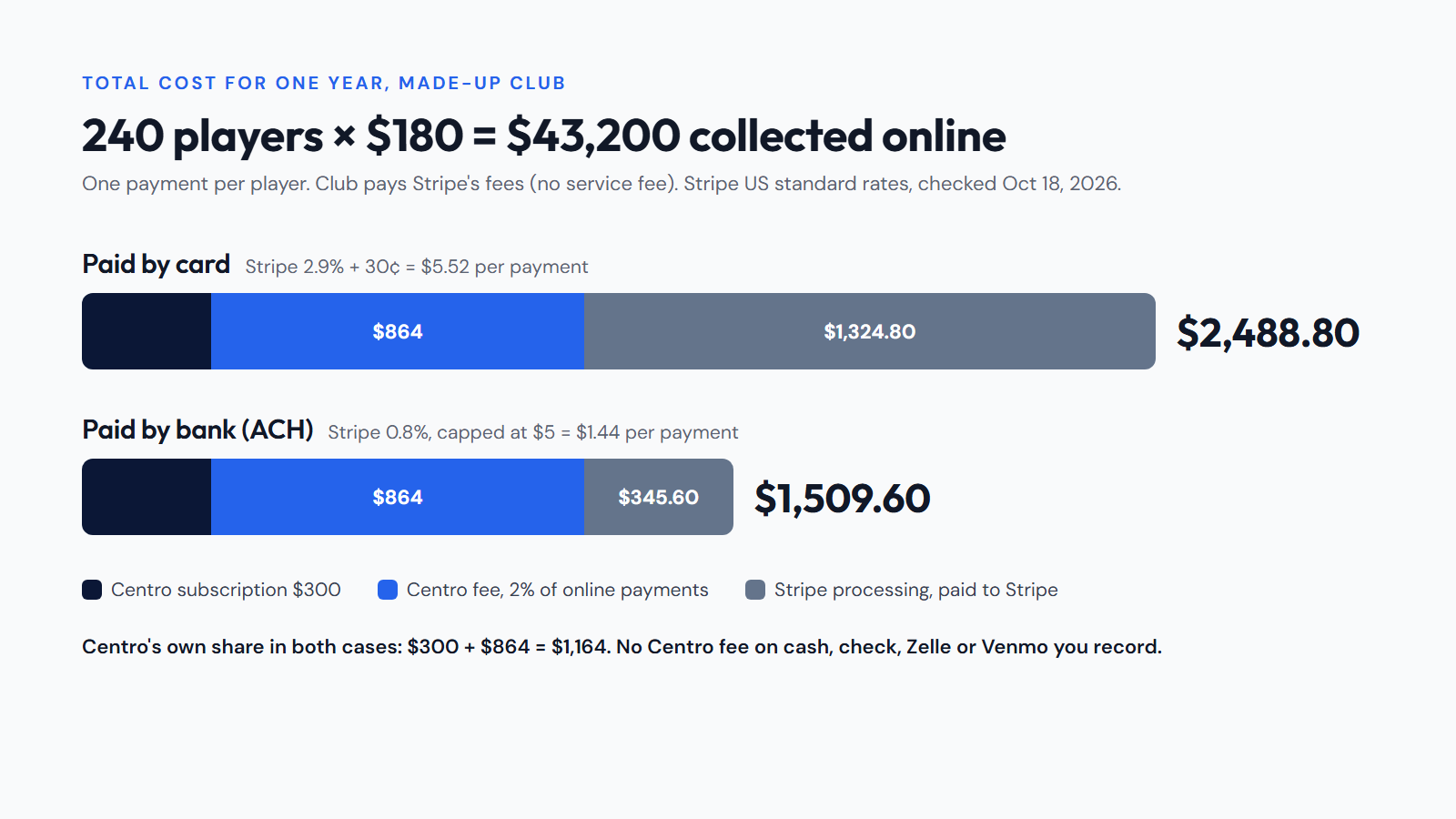
What changes the result: Stripe charges 0.8% for US bank (ACH) payments, capped at $5, so the same 240 payments by bank would cost $1.44 each, $345.60 in total, instead of $1,324.80. There is no Centro fee on cash, check, Zelle or Venmo payments your staff record. The club pays Stripe's fees unless it turns on a service fee, which families then see as part of the price. Stripe does not return its processing fee on refunds. Rates are Stripe's published US standard pricing as of October 18, 2026; your own Stripe account's pricing applies.
Run the same lines for every quote. Our fee calculator helps you set a registration fee once you know these costs, and our pricing page has Centro's current details.
Where Centro fits, and where it does not
Run Centro through the same four tests and judge it on what you see. Our side-by-side comparisons put it next to TeamSnap, LeagueApps, SportsEngine, PlayMetrics and Jersey Watch, with sources. Here is what you should find.
Registration: families register from a phone browser without creating an account, in English or Spanish, and can add siblings on the same form. Each child's waivers are signed with a typed name and a drawn signature.
Billing: each form either bills after staff approve an application (the default) or at sign-up. Siblings share one invoice only when the form bills at sign-up; otherwise each child gets their own invoice. Discounts, including any sibling discount, are applied by staff on invoices they create by hand; registration checkout does not apply them.
Payments: card and bank payments go through your club's own Stripe account, and payouts follow the schedule in your Stripe settings. Staff record cash, check, Zelle or Venmo against invoices and see what each family owes.
Coaches and families: coaches see their own teams' rosters and schedules, and club-wide emails can go out in English and Spanish versions.
What Centro does not do: there is no app in the App Store or Google Play (it runs in the phone's browser), no text messages and no bank reconciliation, so matching payouts to bank deposits happens in your Stripe dashboard and your books. Registration forms check age groups by birth year, not the August 1 cycle. If your association requires its own registration system, or a specialist tool already handles your hardest problem well, that can be a good reason to stay where you are. The registration overview shows how the sign-up side works.
Take your hardest case to every demo
Pick the problem your staff could not solve easily last season and make it the center of each demo. Ask to see it from the parent's side and the staff side, then let your registrar try it. Keep that result next to the written quote. It is a better basis for a decision than any ranked list, including ours.
The trial lasts 14 days and needs no credit card. Centro is $25 a month for the whole club, plus 2% on online payments, with unlimited players, teams and staff. Stripe's processing fees are separate.